Audio Router - Định tuyến âm thanh, chỉnh âm lượng

Với ứng dụng mang tên Audio Router, người dùng Windows 10 có thể dễ dàng điều chỉnh và xuất hai âm thanh ra hai loa ngoài riêng biệt, giúp việc trải nghiệm máy tính trở nên đa dạng hơn.

Về mặt kỹ thuật, Windows chỉ cho phép người dùng xuất một tập tin đa phương tiện ra loa trong một thời điểm. Cụ thể hơn, nếu có nhiều hơn một ứng dụng đang trình chiếu tập tin âm thanh, hệ thống sẽ tự động phát chồng lấn âm thanh trên cùng thiết bị đầu ra.

Không chỉ vậy, ngay cả khi bạn kết nối 2 thiết bị đầu ra (một dành cho cổng USB và một dành cho ngõ âm thanh), hệ thống cũng không cung cấp bất kỳ tùy chọn nào cho phép tách biệt 2 nguồn phát âm thanh ra từng thiết bị riêng biệt.

Tính đến thời điểm hiện tại, mặc dù có khá nhiều ứng dụng cho phép bạn xuất âm thanh ra hai thiết bị khác nhau, tuy nhiên đối với một giải pháp miễn phí, chúng tôi khuyên bạn nên sử dụng Audio Router.

Theo đó, Audio Router là ứng dụng mã nguồn mở miễn phí, cho phép người dùng có thể lựa chọn đầu ra âm thanh của một ứng dụng bất kỳ cho hai loa ngoài khác nhau, qua đó giúp việc trải nghiệm âm thanh trở nên phong phú hơn thay vì bị bó buộc vào một thiết bị đầu ra.

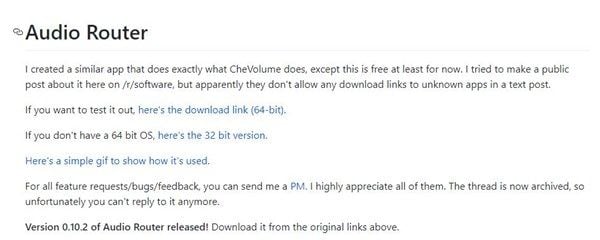
Audio Router là ứng dụng không cài đặt (Portable). Sau khi tải về thông qua liên kết tại đây, bạn chỉ cần giải nén và khởi chạy tập tin Audio Router.exe với quyền quản trị Administrator (bằng cách nhấn phải chuột và chọn Run as Administrator).
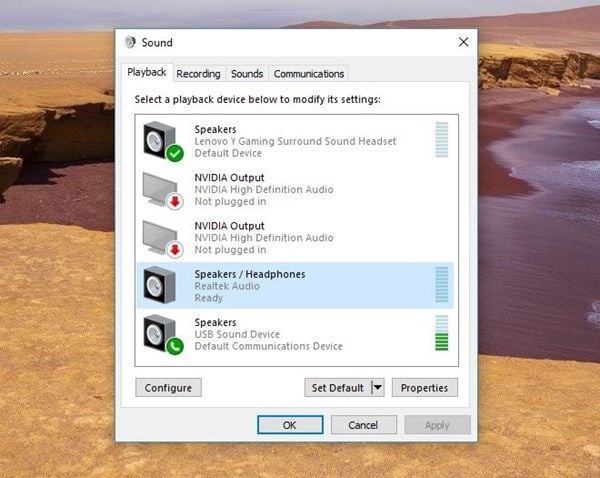
Trước khi sử dụng ứng dụng này, bạn cần phải kiểm tra xem Windows đã nhận diện đây là 2 thiết bị riêng biệt bằng cách nhấn phải chuột vào biểu tượng hình Loa trên khay hệ thống (góc dưới bên phải màn hình), chọn Playback Devices trong thanh ngữ cảnh. Trong giao diện vừa xuất hiện, nếu hệ thống hiển thị 2 biểu tượng OK (dấu tích màu xanh) trên từng thiết bị đầu ra thì có nghĩa là hệ thống đã nhận đủ 2 thiết bị.
Tiếp đến, hãy khởi chạy 2 ứng dụng phát âm thanh riêng biệt, chẳng hạn như một cửa sổ trình duyệt và ứng dụng Media Player của Windows hoặc ứng dụng khác, thậm chí là trò chơi. Lưu ý, 2 ứng dụng phát âm thanh phải là 2 ứng dụng độc lập, nghĩa là bạn không thể mở 2 cửa trình duyệt Chrome hoặc 2 ứng dụng Media Player của Windows cùng lúc.

Theo ghi nhận của PC World Vietnam, thao tác trên Audio Router rất đơn giản, khả năng hoạt động khá mượt mà, ổn định. Chúng tôi có thể dễ dàng thay đổi nguồn phát âm thanh từ 2 ứng dụng khác nhau ra 2 loa ngoài riêng biệt (một cho tai nghe dùng ngõ âm thanh và một cho loa ngoài dùng cổng USB).
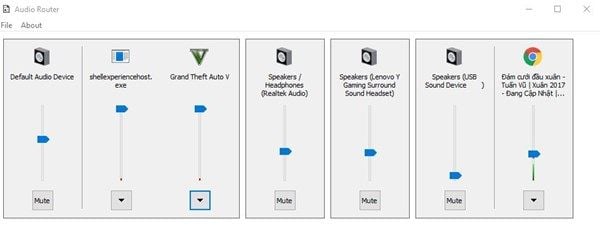
Lúc này, trong giao diện chính của Audio Router, bạn hãy nhấn biểu tượng hình mũi tên bên dưới một trong hai ứng dụng phát âm thanh, chọn Router…
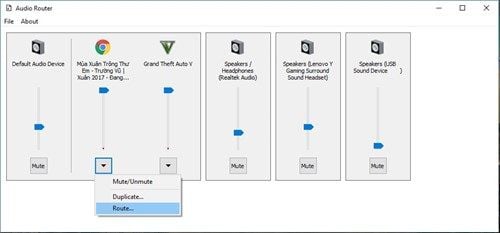
Ở cửa sổ dạng pop-up vừa hiển thị, bạn hãy chọn loa ngoài tương ứng với ứng dụng phát âm thanh đó. Bạn cũng thực hiện tương tự với ứng dụng còn lại.
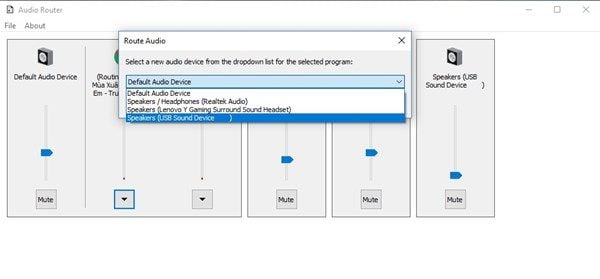
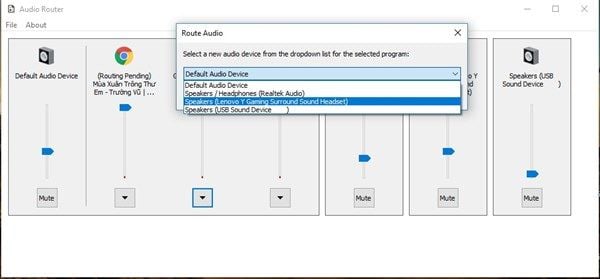
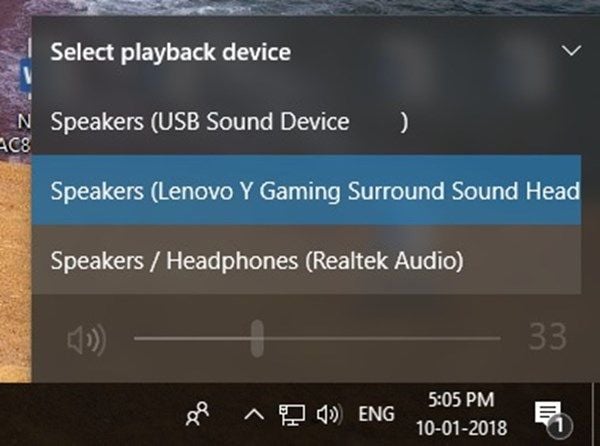
Lưu ý, trong trường hợp ứng dụng thứ hai không phát ra âm thanh đúng ý, bạn hãy nhấn vào biểu tượng hình loa trên khay hệ thống, chọn tiếp loa ngoài mình muốn.
 

Ngoài ra, Audio Router sẽ không nhận chính xác tên của các ứng dụng UWP trên Windows 10, chẳng hạn như ứng dụng TV & Movies sẽ được hiển thị dưới dạng video.ui.exe.

                                                                   - Tài Hoàng theo PCWORLDVN - 

DOWNLOAD


UniKey


UniKey 4.3 RC5 Build 200929 -  Download

UniKey là bộ công cụ hỗ trợ gõ tiếng Việt không thể thiếu khi cài đặt Windows. UniKey cũng trở thành bộ gõ phổ biến nhất hiện nay vượt qua Vietkey với các tính năng tiện ích như: chuyển đổi chữ hoa - chữ thường, gõ tắt, chuyển font chữ VNI sang VNTime (và ngược lại) cùng nhiều kiểu chuyển đổi font chữ khác. Tải UniKey để khắp phục tất cả các lỗi gõ tiếng việt khi đánh văn bản hay gặp khi soạn thảo, chat...

Download Unikey - Bộ gõ Tiếng Việt phổ biến nhất trên Windows, hỗ trợ gõ tiếng Việt có dấu


Tải phần mềm gõ tiếng Việt UniKey hoàn toàn miễn phí, với dung lượng gọn nhẹ, sử dụng đơn giản, không cần cài đặt - UniKey 4.3 trở thành một trong những phần mềm không thể thiếu đối với người dùng máy tính, giúp ích rất nhiều trong soạn thảo văn bản, gõ tiếng Việt có dấu, chuyển đổi font chữ, gõ tắt, viết chữ hoa, kiểm tra lỗi chính tả trong văn bản... và rất nhiều tính năng hữu ích khác.

Sau 2 năm không có phiên bản mới cập nhật, tháng 10 vừa qua UniKey vừa cập nhật phiên bản mới để phù hợp với các thay đổi. Ở phiên bản này UniKey 4.3 RC5 hỗ trợ trình duyệt Edge mới tốt hơn cùng rất nhiều thay đổi để cải tiến về tốc độ cũng như sự tương đồng với những cập nhật mới của hệ thống.

Unikey đã được Ủy ban Quốc gia về chuẩn tiếng Việt Unicode của Bộ Khoa học và Công nghệ khuyến cáo sử dụng trong các cơ quan nhà nước Việt Nam. Đặc điểm nổi bật của Unikey là chạy nhanh và có tính ổn định cao, tương thích với rất nhiều phần mềm hỗ trợ Unicode...

Download.com.vn đã test thử và thấy Unikey 4.3 hoàn toàn có thể chạy trơn tru trên Windows 10!

Tính năng chính của phần mềm gõ tiếng Việt Unikey

  • Unikey hỗ trợ gõ tiếng Việt trên Windows (bao gồm cả Windows 32-bit và 64-bit), gõ tiếng việt trong các ứng dụng Văn phòng như Word, Excel... hay thậm chí cả các ứng dụng đồ họa như PhotoShop, Corel...

  • Với Unikey, bạn có thể dễ dàng chuyển đổi font chữ từ VNI sang Unicode hay từ TCVN3 sang Unicode, định nghĩa các phím tắt cho cụm từ, chuyển chữ từ có dấu sang không dấu, chuyển sang chữ hoa hoặc chữ thường...

  • Unikey là ứng dụng gõ tiếng Việt hoàn toàn miễn phí và không có quảng cáo.

  • Ứng dụng chạy gọn nhẹ, phù hợp với mọi cấu hình máy tính.

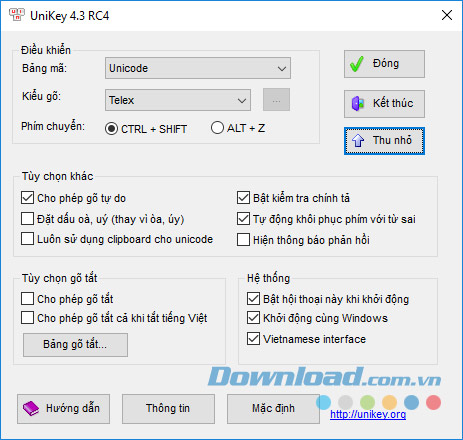
Màn hình Unikey mở rộng
Bảng điều khiển của phần mềm gõ tiếng Việt Unikey khi chạy trong Windows

Vậy hãy tải Unikey mới nhất về máy tính để hỗ trợ gõ tiếng Việt, công cụ này cung cấp nhiều bảng mã tiếng Việt như: Unicode, TCVN3 (ABC), VNI Windows, VIQR, Vietnamese locale CP 1258, Unicode tổ hợp, UTP-8 Literal, NCR Decimal, NCR Hex, Unicode Cstring, X UTF-8, VISCII, VPS, BK HCM1, BK HCM2, Vietware X, Vietware F. Đồng thời, hỗ trợ 5 kiểu gõ khác nhau: Telex, VNI, VIQR, Microsoft và kiểu tự định nghĩa.

Cũng như một số phần mềm khác thì Unikey cũng tích hợp tính năng tự khởi động cùng Windows để mỗi khi soạn thảo văn bản hay chat trên máy tính, bạn có thể gõ tiếng Việt được ngay lập tức. Nếu bản UniKey bạn đang sử dụng gặp vấn đề về tính tương thích với Windows Vista, hãy nhanh chóng tải Unikey Vista để hỗ trợ gõ tiếng Việt tốt hơn nhé.

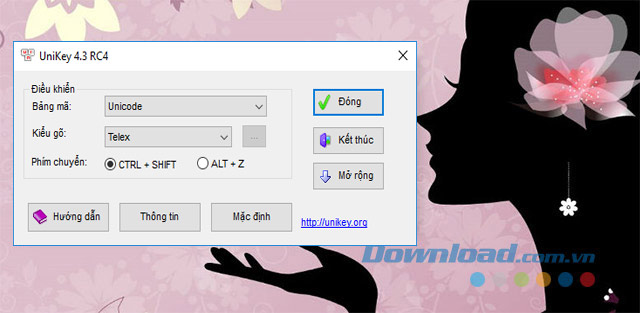
Khởi chạy Unikey 4.3 RC4 trên Windows 10
Phần mềm gõ tiếng Việt Unikey có thể chạy "ngon lành" trên Windows 10

Thay đổi dễ thấy nhất trong phiên bản Unikey 4.3 RC5 Build 200929 đó là các tập tin thư viện DLL và tập tin chạy EXE đã được gộp lại thành một file UniKeyNT.exe duy nhất. Bên cạnh đó, lỗi thiếu thư viện MSVCR120.DLL khi Unikey chạy trên Windows 8 cùng nhiều vấn đề như phím tắt chuyển chế độ gõ chưa ổn định, sai chữ hoa - chữ thường trong các ứng dụng Modern cũng đã được khắc phục. Trong bản update Unikey mới nhất, tác giả Phạm Kim Long có bổ sung thêm khả năng hiển thị thông báo khi bạn chuyển giữa việc gõ tiếng Anh với tiếng Việt. Hiện Unikey 4.3 RC5 chỉ mới được phân phối dưới dạng file zip (bạn cần giải nén và chạy trực tiếp để dùng).


Bước 1:

  • Tại giao diện chính hãy nhấn nút Tải về để tải bộ cài phần mềm Unikey.

Bước 2:

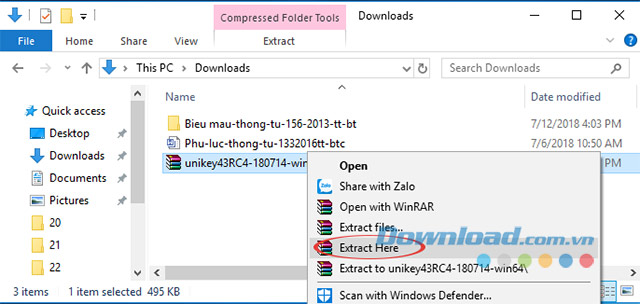
  • Sau khi tải về hoàn tất hãy dùng phần mềm giải nén như 7-Zip hoặc Winrar để giải nén.

    Tiếp đó nhấn vào file UniKeyNT.exe để khởi chạy công cụ hỗ trợ gõ tiếng Việt Unikey trên máy tính của bạn.

Chú ý:
Nếu sau khi nhấn chuột phải vào file này mà không thấy mục giải nén (Extract files...) xuất hiện, nghĩa là các bạn chưa cài đặt công cụ giải nén. Hiện nay có khá nhiều công cụ giải nén hiệu quả mà lại hoàn toàn miễn phí. Các bạn có thể sử dụng 7-Zip, WinRAR hoặc WinZip...

Cài Unikey 4.3 RC3
Kích chuột trái vào tập tin unikey43RC4-xxxx.zip để giải nén UniKey

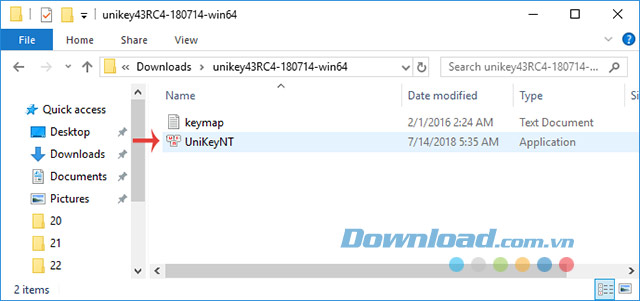
Bước 4: Sau khi giải nén thành công, chúng ta có hai tệp mới, là keymap và file chạy UniKey với biểu tượng ở đầu. Click đúp chuột trái vào file đó.

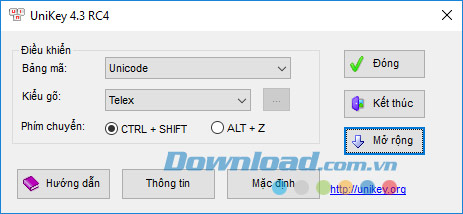
Unikey 4.3 RC4
Giao diện đơn giản và dễ sử dụng của UniKey

Vậy là xong! Cho dù bạn không hiểu biết nhiều lắm về cách sử dụng máy tính, nhưng bài viết này cũng đã hướng dẫn chi tiết các bạn cách tair Unikey về và cài đặt công cụ gõ tiếng Việt phổ biến nhất này trên máy tính rồi.

Những thay đổi trong UniKey mới nhất

UniKey 4.3 RC5

  • UniKey 4.3 RC5 64 bit, ZIP file: Build 200929. Hỗ trợ Windows 64-bit.

  • UniKey 4.3 RC5 32 bit, ZIP file: Build 200929. Hỗ trợ Windows 32-bit và 64-bit.

  • Thêm tùy chọn bật/tắt tiếng khi chuyển ngôn ngữ.

  • Tương thích tốt hơn với trình duyệt Edge mới của Windows.

UniKey 4.3 RC4

  • UniKey 4.3 RC4 32 bit Build 180714 (file Zip). Hỗ trợ Windows 7/8/10 32bit và 64bit.

  • UniKey 4.3 RC4 64 bit Build 180714 (file Zip). Hỗ trợ Windows 7/8/10 64bit.

Trước khi chạy UniKey lần đầu tiên, bạn hãy kiểm tra chứng thực chữ ký số. Quá đó, người dùng có thể kiểm tra và biết được phần mềm gõ tiếng Việt của mình có an toàn, chính hãng không. Đồng thời, bản 4.3 RC4 sửa một số lỗi nhỏ sau đây:

  • Sửa lỗi không gõ được trong một số ứng dụng (Console, Game, UWP Universal Windows Platform).

  • Sửa lỗi không xóa/thay hết chữ trong Opera (đã sửa lỗi này cho Excel, Chrome, Firefox, Edge, IE từ bản RC3).

UniKey 4.3 RC3

  • Unikey 4.3 RC3 32bit Build 180702 (file Zip, kích thước 384 KB). Hỗ trợ Windows 7/8/10 32bit và 64bit.

  • Unikey 4.3 RC3 64bit Build 180702 (file Zip, kích thước 450 KB). Hỗ trợ Windows 7/8/10 64bit.

UniKey 4.3 RC1

  • Unikey 4.3 RC1 32bit Build 180623 (file Zip, kích thước 381 KB). Hỗ trợ Windows 7/8/10 32bit và 64bit.

  • Unikey 4.3 RC1 64bit Build 180623 (file Zip, kích thước 490 KB). Hỗ trợ Windows 7/8/10 64bit.

UniKey 4.2 RC4

Nếu đang sử dụng hệ điều hành Windows 8 trở lên, bạn sẽ cần sử dụng phiên bản gõ UniKey mới nhất 4.3 RC1. Nếu đang sử dụng Windows 7 trở về trước thì UniKey 4.2 RC4 đôi khi hoạt động bị lỗi, vậy trường hợp này bạn nên sử dụng UniKey 4.0 RC2.

  • UniKey 4.2 RC4 32 bit Build 140823 (file ZIP, kích thước 197 KB). Hỗ trợ Windows 7, 8, 8.1 32-bit/64-bit

  • UniKey 4.2 RC4 64 bit Build 140823 (file ZIP, kích thước 229 KB). Hỗ trợ Windows 7, 8, 8.1 64-bit

UniKey 4.0 RC2

  • UniKey 4.0 RC2 32 bit Build 091101 (file ZIP, kích thước 608 KB). Hỗ trợ Windows Windows 2K/XP 32-bit trở lên.

  • UniKey 4.0 RC2 64 bit Build 091101 (file ZIP, kích thước 635 KB). Hỗ trợ Windows Windows 2K/XP 64-bit trở lên.

Download


CCleaner 4.12.4657

Description 
Probably the most popular freeware cleaner globally with over 1 billion downloads since its launch in 2003. Piriform’s CCleaner is a quick and easy to use program which makes your computer faster, more secure and more reliable. CCleaner removes cookies, temporary files and various other unused data that clogs up your operating system. This frees up valuable hard disk space allowing your system to run faster. Removing this data also protects your anonymity meaning you can browse online more securely. The built in Registry Cleaner fixes errors and broken settings to make your computer more stable. The simple, intuitive UI and rapid but powerful cleaning make CCleaner a favourite among novices and techies alike. Professional, Network, Business and Technician Editions of CCleaner are also available for serious users.
A Faster Computer
Browsing the internet your computer picks up a whole host of unnecessary files, cookies and history. The same thing happens when you run most programs on your computer – lots of temporary files and settings are saved. CCleaner removes these unused files and settings to free up valuable hard drive space, enabling your system to run faster. The default settings only focus on typical junk files and locations so you’re unlikely to lose important information unless you alter these. A Startup Cleaner also helps you to identify and remove unused programs running in the background when you start your computer. This makes the startup time shorter and puts less strain on your hard drive throughout use.
Less Crashes & System Errors
If you notice lots of system freezes, error messages and often experience crashes, the chances are your registry become cluttered with unused files and broken settings. CCleaner’s fully featured Registry Cleaner identifies these issues and fixes them. The registry analysis takes seconds and cleaning just a little bit longer. Prompts advise you when to save backups to avoid losing important data.
More Secure Browsing
Advertisers and websites track your behaviour online with cookies. Saved passwords, cached data and internet histories make your identity less secure. CCleaner removes these files to make your browsing experience confidential, meaning you are less likely to suffer from identity theft and/or online fraud. The military grade Drive Wiper ensures any data you want to be permanently deleted, stays deleted.
Customisable Cleaning
CCleaner Tools and Options tabs allow you to customise cleaning options to fit your needs. If you are not a savvy user, you might want to stick with the safe default settings. Advanced users can uninstall unwanted programs, select which cookies to save, customise cleaning settings and setup system monitoring.
Summary
CCleaner has earned its position at the top of the freeware cleaners offering the sort of features premium programs struggle to compete with. The clean, intuitive UI makes it one of the easiest programs to use, but don’t let its size and simplicity fool you. This is a powerful utility for improving your computers performance. Piriform’s regular update process means CCleaner is constantly improving and its popularity will continue to grow.
 
Technical  
Title: CCleaner 4.12.4657
Filename: ccsetup412.exe
File size: 4.57MB (4,787,368 bytes)
Requirements: Windows 2000 / XP / Vista / Windows7 / XP64 / Vista64 / Windows7 64 / Windows8 / Windows8 64
Languages: Multiple languages
License: Freeware
Date added: March 25, 2014
Author: Piriform
www.piriform.com
MD5 Checksum: 565592D342E241EB6FCA351F9C810AE3
 
 
Older Versions
 

Winamp 5.666 Full Build 3516

Description

Winamp is a skinnable, multi-format media player.
Winamp supports a wide variety of contemporary and specialized music file formats, including MIDI, MOD, MPEG-1 audio layers 1 and 2, AAC, M4A, FLAC, WAV, OGG Vorbis, and Windows Media Audio. It supports gapless playback for MP3 and AAC, and Replay Gain for volume leveling across tracks. In addition, Winamp can play and import music from audio CDs, optionally with CD-Text, and can also burn music to CDs. Winamp supports playback of Windows Media Video and Nullsoft Streaming Video, as well as most of the video formats supported by Windows Media Player. 5.1 Surround sound is supported where formats and decoders allow.
Winamp supports many types of streaming media: Internet radio, Internet telelvision, XM Satellite Radio, AOL video, Singingfish content, podcasts, and RSS media feeds. It also has extendable support for portable media players, and users can access their media libraries anywhere via internet connections.
You can extend Winamp's functionality through the use of plug-ins, which are available on the Winamp site.

Technical 
Title: Winamp 5.666 Full Build 3516
Filename: winamp5666_full_all.exe
File size: 16.37MB (17,163,336 bytes)
Requirements: Windows 2000 / XP / Vista / Windows7 / XP64 / Vista64 / Windows7 64 / Windows8 / Windows8 64
Languages: Multiple languages
License: Freeware
Date added: December 13, 2013
Author: Nullsoft
www.nullsoft.com
Homepage: www.winamp.com
MD5 Checksum: 110CD80079E9572AEF511B0491E63B8C


Firefox 28.0 Beta 7

Description

Mozilla Firefox is a fast, light and tidy open source web browser. At its public launch in 2004 Mozilla Firefox was the first browser to challenge Microsoft Internet Explorer’s dominance. Since then, Mozilla Firefox has consistently featured in the top 3 most popular browsers globally. The key features that have made Mozilla Firefox so popular are the simple and effective UI, browser speed and strong security capabilities. The browser is particularly popular with developers thanks to its open source development and active community of advanced users.
Easier Browsing
Mozilla put of a lot of resources into creating a simple but effective UI aimed at making browsing quicker and easier. They created the tab structure that has been adopted by most other browsers. In recent years Mozilla has also focused on maximizing browsing area by simplifying toolbar controls to just a Firefox button (which contains settings and options) and back/forward buttons. The URL box features direct Google searching as well as an auto predict/history feature called Awesome Bar. On the right side of the URL box there are bookmarking, history and refresh buttons. To the right of the URL box is a search box which allows you to customize your search engine options. Outside of that a view button controls what you see below the URL. Next to that you have the download history and home buttons.
Speed
Mozilla Firefox boasts impressive page load speeds thanks to the excellent JagerMonkey JavaScript engine. Start up speed and graphics rendering are also among the quickest in the market. Firefox manages complex video and web content using layer-based Direct2D and Driect3D graphics systems. Crash protection ensures only the plugin causing the issue stops working, not the rest of the content being browsed. Reloading the page restarts any affected plugins. The tab system and Awesome Bar have been streamlined to launch/get results very quickly too.
Security
Firefox was the first browser to introduce a private browsing feature which allows you to use the internet more anonymously and securely. History, searches, passwords, downloads, cookies and cached content are all removed on shutdown. Minimizing the chances of another user stealing your identity or finding confidential information. Content security, anti-phishing technology and antivirus/antimalware integration ensures your browsing experience is as safe as possible.
Personalisation & Development
One of the best features of the Firefox UI is customization. Simply right click on the navigation toolbar to customize individual components or just drag and drop items you want to move around. The inbuilt Firefox Add-ons Manager allows you to discover and install add-ons within the browser as well as view ratings, recommendations and descriptions. Thousands of customizable themes allow you to customize the look and feel of your browser. Site authors and developers can create advanced content and applications using Mozilla’s open source platform and enhanced API.
 
 Technical 
Title: Firefox 28.0 Beta 7
Filename: Firefox Setup 28.0b7.exe
File size: 25.20MB (26,425,640 bytes)
Requirements: Windows 2000 / XP / Vista / Windows7 / XP64 / Vista64 / Windows7 64 / Windows8 / Windows8 64
Languages: en-US
License: Open Source
Date added: February 28, 2014
Author: Mozilla Organization
www.mozilla.org
MD5 Checksum: DB85527638BF603829785C5E05A48CD6
 

Avast! Free Antivirus 9.0.2013

Description

Avast! Free Antivirus is an efficient and comprehensive antivirus program. It is one of the most popular antivirus programs available, thanks to the reliable and trustworthy brand that Avast have created. The key features that continue to make Avast! Free Antivirus so popular are the easy UI, optimized scanning options and continuously updated database of virus definitions.
Simple, improved UI
The 2014 version includes a much simpler and quicker to use UI. Key features can be easily reached in the sidebar and the homepage is now customizable so you can access the tools you use most often directly. The overall appearance is clean and uncluttered, with buttons intuitively labelled and positioned.
Comprehensive Protection
Avast are constantly updating their database of virus definitions, meaning your computer will be protected against the latest spyware, viruses and potentially hazardous websites. Avast’s large and active community quickly alerts the development team of new security threats which are swiftly countered and added to Avast’s significant database. The browser add-on further improves computer security with features like cookie and social tracking blocking.
Speed
Avast! Free Antivirus comes with 5 standard scanning options based on depth and speed. Rapid scan will suffice in most cases - targeting removable media and the files you select, identifying security threats in usually less than a minute. A startup scan will launch automatically on boot up and is a useful, regular security check. The optimized scan engine in the 2014 version means scanning of text content is 10 times faster than previous versions. Scanning of EXE files is around 2 times faster. Improved memory usage means Avast! Free Antivirus should cause less strain on your system so you can continue with other tasks faster.
Summary
Avast! Free Antivirus is definitely one of the best free total security managers available. It is relatively lightweight and efficient, while still providing comprehensive security protection. The browser add on can slow browsing speed and the scanning might not be as detailed as some premium antivirus options. But the simple, effective UI and strong security capabilities make Avast! Free Antivirus a very good choice for those looking for free computer security.
 
Technical
 
Title: Avast! Free Antivirus 9.0.2013
Filename: avast_free_antivirus_setup.exe
File size: 86.38MB (90,578,216 bytes)
Requirements: Windows 2000 / XP / Vista / Windows7 / XP64 / Vista64 / Windows7 64 / Windows8 / Windows8 64
Languages: Multiple languages
License: Non-Commercial Freeware
Date added: January 23, 2014
Author: Avast Software
www.avast.com
MD5 Checksum: D036446E7ED16FF3063501F3D9FDDBBE
 
 Download Avast! Free Antivirus 9.0.2013

Adobe Reader 11.0.06


Adobe Reader is the most popular program in the world for viewing, creating, managing and manipulating PDF (Portable Document Format) files. It is the standard that all other PDF readers are judged against. Publically released in 1993, Adobe Reader was originally priced at $50 per user before Adobe separated its product range to offer Adobe Reader freeware and their professional Adobe Acrobat versions. PDF became the file format of choice for businesses thanks to its cross platform flexibility and security capabilities.
Simple UI
Adobe Reader’s UI is simple and intuitive. Classic tools (text selection, zoom, snapshots, find, etc.) can be accessed from the top navigation menu and buttons. The latest version also includes advanced Tools (create, export, send and store options), Sign and Comment features. You can share iterations, comments and signatures by email or using the Adobe SendNow service.
Security
Adobe Reader XI is the safest version Adobe have released. This is mainly due the new Protected Mode which loads potentially hazardous items and code in a sandboxed area, isolated from the rest of your system.
Speed
There have been some criticisms over Adobe Reader’s speed compared to other lightweight PDF readers. It’s true; Adobe Reader does have more plugins and extensions than most PDF readers which can slow operation. That being said the difference for the average user is negligible and those add-ons can be disabled if they are not required. In terms of general operation, Adobe Reader renders documents with high detail and true colour reproduction quickly. Later editions have also had work done to improve Adobe Reader’s impact on memory usage so you should find multitasking takes less strain on your system.

Title: Adobe Reader 11.0.06
Filename: AdbeRdr11006_en_US.exe
File size: 48.48MB (50,837,888 bytes)
Requirements: Windows 2000 / XP / Vista / Windows7 / XP64 / Vista64 / Windows7 64 / Windows8 / Windows8 64
Languages: en-US
License: Freeware
Date added: January 14, 2014
Author: Adobe Systems Inc
www.adobe.com
 

CCleaner 4.09.4471

Description

Probably the most popular freeware cleaner globally with over 1 billion downloads since its launch in 2003. Piriform’s CCleaner is a quick and easy to use program which makes your computer faster, more secure and more reliable. CCleaner removes cookies, temporary files and various other unused data that clogs up your operating system. This frees up valuable hard disk space allowing your system to run faster. Removing this data also protects your anonymity meaning you can browse online more securely. The built in Registry Cleaner fixes errors and broken settings to make your computer more stable. The simple, intuitive UI and rapid but powerful cleaning make CCleaner a favourite among novices and techies alike. Professional, Network, Business and Technician Editions of CCleaner are also available for serious users.
A Faster Computer
Browsing the internet your computer picks up a whole host of unnecessary files, cookies and history. The same thing happens when you run most programs on your computer – lots of temporary files and settings are saved. CCleaner removes these unused files and settings to free up valuable hard drive space, enabling your system to run faster. The default settings only focus on typical junk files and locations so you’re unlikely to lose important information unless you alter these. A Startup Cleaner also helps you to identify and remove unused programs running in the background when you start your computer. This makes the startup time shorter and puts less strain on your hard drive throughout use.
Less Crashes & System Errors
If you notice lots of system freezes, error messages and often experience crashes, the chances are your registry become cluttered with unused files and broken settings. CCleaner’s fully featured Registry Cleaner identifies these issues and fixes them. The registry analysis takes seconds and cleaning just a little bit longer. Prompts advise you when to save backups to avoid losing important data.
More Secure Browsing
Advertisers and websites track your behaviour online with cookies. Saved passwords, cached data and internet histories make your identity less secure. CCleaner removes these files to make your browsing experience confidential, meaning you are less likely to suffer from identity theft and/or online fraud. The military grade Drive Wiper ensures any data you want to be permanently deleted, stays deleted.
Customisable Cleaning
CCleaner Tools and Options tabs allow you to customise cleaning options to fit your needs. If you are not a savvy user, you might want to stick with the safe default settings. Advanced users can uninstall unwanted programs, select which cookies to save, customise cleaning settings and setup system monitoring.
Summary
CCleaner has earned its position at the top of the freeware cleaners offering the sort of features premium programs struggle to compete with. The clean, intuitive UI makes it one of the easiest programs to use, but don’t let its size and simplicity fool you. This is a powerful utility for improving your computers performance. Piriform’s regular update process means CCleaner is constantly improving and its popularity will continue to grow.


Download: CCleaner 4.09.4471


DAEMON Tools Lite 4.48.1

Description

With DAEMON Tools you can back up your physical CD/DVD/HD DVD/Blu-ray discs into "virtual discs" or so called "disc image" files, which run directly on your hard drive. You can also work with images created by other burning programs! DAEMON Tools supports variety of image types. Use CD/DVD image converter to have one format images in your Image Catalog!
1. Emulate virtual CD/DVD-ROM/HD DVD and Blu-ray drives
DAEMON Tools Lite [Commercial] enables you to emulate up to 4 CD/DVD virtual drives on your PC. Virtual drives will appear in your OS just like real ones. Select a virtual drive then choose a disc image you want to mount. Find the created virtual drive with mounted disc image in My Computer. Start working! Looks like working with a real drive and a real disc, doesn't it? Yes, but it is much faster!
2. Create a disc image
With DAEMON Tools Lite [Commercial] you can create ISO and MDS image files from original discs inserted in physical CD/DVD/HD DVD/Blu-ray drives. Or use images you have created earlier with other program. DAEMON Tools products work with variety of image types.
Key features
  • creates *.iso and *.mds images;
  • emulates up to 4 virtual CD/DVD drives;
  • performs image mounting and unmounting;
  • supports *.b5t, *.b6t, *.bwt, *.ccd, *.cdi, *.cue, *.nrg, *.pdi, *.isz;
  • offers powerful command line interface.

 Technical 

Title: DAEMON Tools Lite 4.48.1
Filename: DTLite4481-0347.exe
File size: 12.86MB (13,485,616 bytes)
Requirements: Windows 2000 / XP / Vista / Windows7 / XP64 / Vista64 / Windows7 64 / Windows8 / Windows8 64
Languages: Multiple languages
License: Freeware
Date added: October 29, 2013
Author: DAEMON Tools
www.daemon-tools.cc
MD5 Checksum: CE9F84F734CBB6A29EEE377112D9E5CF

Download: DAEMON Tools Lite 4.48.1


Share Key Kaspersky Anti-Virus + Kaspersky Internet Security


Kaspersky anti-virus protects you from the Phishing and Malware sites that you wouldn't otherwise know were attempting to steal from you.
At the same time, the Kaspersky Security Network allows your computer to report when it discovers a threat that hasn't been seen before. All 250 million Kaspersky users benefit from our combined knowledge!
Kaspersky features include:
  • Protects from viruses, Trojans, worms, spyware, adware
  • Scans files, email, and internet traffic
  • Protects Instant Messengers
  • Protects From Unknown Threats
  • Analyzes and closes Internet Explorer vulnerabilities
  • Disables links to malware sites / phishing sites
  • Global Threat Monitoring (Kaspersky Security Network)
  • Blocks all types of keyloggers
  • Automatic Database Updates
  • Free Technical Support

Title:Kaspersky
Filename:
File size:
Requirements:Windows XP / Vista / Windows7 / XP64 / Vista64 / Windows7 64 / Windows8 / Windows8 64
Languages:en-US
License:Commercial Trial
Date added:August 28, 2013
Author:Kaspersky
www.kaspersky.com

Download Software: http://www.kaspersky.com/

01 KIS13_2014-09-26_x2_1A66B475.key

02 KIS9!_2014-08-18_219F8950.key

03 KIS9!_2014-08-25_21D87FEA.key

04 KIS9!_2014-08-29_2201B8D6.key

05 KIS9!_2014-08-29_2201B88B.key

06 KIS13_2014-09-25_x2_20F49B4D.key

07 KIS13_2014-09-26_x2_1A186036.key

08 K-PURE2_2014-02-03_x3_1587DFE9.key

09 KTSS_2014-06-04_x200000_1E3D4580.key

10 KTSS_2015-01-02_x9000_146FC861.key

11 KIS9!_2014-07-27_20F340DB.key

12 KIS9!_2014-07-29_2101FCC1.key

13 KIS9!_2014-07-29_21046CEB.key

14 KIS9!_2014-07-31_210E261E.key

15 KIS9!_2014-08-01_2112EF9D.key

16 ....30 Later

How To Activate Kaspersky 2013 Using Key File ?


WinRAR 4.20 + Serial + Crack + Keygen


WinRAR is an archiving utility that completely supports RAR and ZIP archives and is able to unpack CAB, ARJ, LZH, TAR, GZ, ACE, UUE, BZ2, JAR, ISO, 7Z, Z archives. It consistently makes smaller archives than the competition, saving disk space and transmission costs.
WinRAR offers a graphic interactive interface utilizing mouse and menus as well as the command line interface. WinRAR is easier to use than many other archivers with the inclusion of a special "Wizard" mode which allows instant access to the basic archiving functions through a simple question and answer procedure.
WinRAR offers you the benefit of industry strength archive encryption using AES (Advanced Encryption Standard) with a key of 128 bits. It supports files and archives up to 8,589 billion gigabytes in size. It also offers the ability to create selfextracting and multivolume archives. With recovery record and recovery volumes, you can reconstruct even physically damaged archives.

Title:WinRAR 4.20 (64-bit)
Filename:winrar-x64-420.exe
File size:1.58MB (1,656,459 bytes)
Requirements:Windows XP64 / Vista64 / Windows7 64 / Windows8 64
Languages:en-US
License:Shareware
Date added:June 15, 2012
Author:RARLab

Download 
WinRAR 4.20 32-bit Rapidgator  or   Mediafire
WinRAR 4.20 64-bit Rapidgator  or   Mediafire

Keygen   Rapidgator  or  Mediafire
Pass:downloadeverything-software.blogspot.com

copy file rarreg: C:\Program Files\WinRAR

AntiVir Personal 13.0.0.3499

Avira AntiVir Personal - FREE Antivirus is a reliable free antivirus solution, that constantly and rapidly scans your computer for malicious programs such as viruses, Trojans, backdoor programs, hoaxes, worms, dialers etc. Monitors every action executed by the user or the operating system and reacts promptly when a malicious program is detected.

  • Detects and removes more than 150,000 viruses
  • Always among the winners of comparison test featured in computer journals
  • The resident Virus Guard serves to monitor file movements automatically, e.g. downloading of data from the internet
  • Scanning and repair of macro viruses
  • Protection against previously unknown macro viruses
  • Protection against trojans, worms, backdoors, jokes and other harmful programs
  • AntiVir protection against viruses, worms and Trojans
  • AntiDialer protection against expensive dialers
  • AntiRootkit protection against hidden rootkits
  • AntiPhishing protection against phishing
  • AntiSpyware protection against spyware and adware
  • NetbookSupport for laptops with low resolution
  • QuickRemoval eliminates viruses at the push of a button
  • Easy operation
  • Internet-Update Wizard for easy updating
  • Protection against previously unknown boot record viruses and master boot record viruses

Title:AntiVir Personal 13.0.0.3499
Filename:avira_free_antivirus_en.exe
File size:108.39MB (113,660,160 bytes)
Requirements:Windows 2000 / XP / Vista / Windows7 / XP64 / Vista64 / Windows7 64
Languages:en-US
License:Non-Commercial Freeware
Date added:March 21, 2013
Author:Avira GmbH


Alcohol 120% 7.0 Full + Serial + Crack + Keygen


Features:
• Alcohol 120% enables you to make a duplicate back-up to recordable media of nearly
all your expensive Game/Software/DVD titles, and/or an image that can be
mounted and run from any one of Alcohol's virtual drives.
• No other software available enables you to create up to a staggering 31 virtual drives,
allowing you to run your game images at over 200x faster than from a conventional CD-ROM.
Alcohol 120% is a powerful utility that uses a unique combination of options to
ensure a perfect back-up every time.
• All you need is a PC combined with a CD or a DVD burner. No more replacing your
expensive original discs due to loss, theft, scratches, or other media imperfections.
Your duplicate works just like the original; your entire collection can be archived
and your investment protected.
• In the home: Have you had experiences with the common conditions of CDs/DVDs? They
can easily get scratched, damaged, broken, lost or even stolen. Alcohol provides you
with peace of mind and protects your investment.
• Your original games/program discs can be safely stored away. Alcohol-created images
mean that you always have your expensive media stored safely on your hard drive for
instant retrieval at the click of a button. No more searching for the correct game disc
or software application install disc, everything is at your fingertips.
• You can now, for instance, simultaneously play your favourite game and bring up your
route planner without having to eject and reload any physical discs, The 31 virtual drive
ability of Alcohol means you can have the equivalent of a staggering 31 CD-ROM drives in
your Home PC, all instantly accessible. You can simply and quickly run your Disc image at
around 200 times faster than that of a conventional CD-ROM drive. If you need a program or
CD it is immediately there - always ready to use!
• At the office: Program discs and many other applications generally require the original
disc to be in the computer's CD-ROM drive. This restricts the amount of people in your office
who can have access to the same software at the same time without the cost of additional discs.
Alcohol's virtual drives resolve that problem for you. No more hunting around the offices for that
elusive disc you need to run your application, everything you require is just a click away.
• With Alcohol you can store your CD images on your office server, your colleagues and employees at
their respective networked workstations will never need to come asking for a CD again, they will
not even require an expensive CD-ROM drive installed in their workstation PC! A simple click is all
that is required for them to have full access to any disc image they require for their day to day work.
Your valuable CDs can be safely kept under lock and key.
• Does your company have a promotional CD for it's customers? Original pressed discs are expensive,
using the Alcohol 120% writing engine you can copy the original to inexpensive blank discs for
distribution to your customers and keep your overheads down.
• Alcohol software offers unrivalled usage to people from all walks of life regardless of if you are a
hardened game player, busy school teacher, salesman, IT manager, student etc. Alcohol has a niche
in all your everyday computer needs. Let Alcohol help you to help yourselves and give you the peace
of mind you deserve when it comes to expensive PC media

Requirements:Windows 2000 / XP / Vista / Windows7 / XP64 / Vista64 / Windows7 64 / Windows8 / Windows8 64
Languages:Multiple languages


Adobe Dreamweaver CS6 + Serial + Crack + Keygen

Adobe’s Dreamweaver is start-of-the-art among the professional web authoring tools. The WYSIWYG editor is a tool for developers and designers alike with its code and design view. The latter makes it suitable for novice website developers who like to build their first site without having to edit HTML code or write extensive CSS stylesheets.
Dreamweaver supports new and established web technologies including CSS3, PHP, JavaScript, Flash and AJAX as well as jQuery and HTML5 for mobile-first sites. Fluid grid layouts allow designers to specify how a site behaves when viewed on smart phones or tablets. Live View shows a preview of the web pages using the WebKit rendering engine. Other Dreamweaver features include FTP transfer, Subversion support, W3C validation, CSS3 transitions, and integration with Adobe Business Catalyst and Adobe PhoneGap.
 
What's New in Dreamweaver CS6:
  • jQuery Mobile support - Add advanced interactivity with jQuery code hinting. jQuery makes it simple to add interactivity to web pages. Get a jump start with starter templates for mobile phones.
  • PhoneGap support - Build and package native apps for Android and iOS with Adobe PhoneGap. Convert existing HTML to a mobile phone app within Dreamweaver using the PhoneGap framework. Test layouts with the provided emulator.
  • Multiscreen Preview panel - Design for smartphones, tablets, and desktops with the Multiscreen Preview panel. Use media query support to style and visualize rendering of your designs for a wide range of devices.
  • Fluid grid layout - Construct complex web designs and layouts without getting buried in code. Fluid grid layout is adaptive to help you design projects that display on different screen sizes for desktops and devices.
  • Live View - Check your pages before publishing with a WebKit rendering engine that supports display of HTML5 content. Help ensure cross-browser compatibility and consistent display of your layouts.
  • CSS3/HTML5 support - Style with the CSS panel, which supports CSS3. Design view supports media queries for applying different styles to fit screen dimensions. Design view and code hinting support HTML5.
Download: Adobe Dreamweaver CS6
Pass:downloadeverything-software.blogspot.com

+
Pass:downloadeverything-software.blogspot.com

Speccy 1.21.491

Speccy will give you detailed statistics on every piece of hardware in your computer. Including CPU, Motherboard, RAM, Graphics Cards, Hard Disks, Optical Drives, Audio support. Additionally Speccy adds the temperatures of your different components, so you can easily see if there's a problem!

  • Processor brand and model
  • Hard drive size and speed
  • Amount of memory (RAM)
  • Graphics card
  • Operating system
At first glance, Speccy may seem like an application for system administrators and power users. It certainly is, but Speccy can also help normal users, in everyday computing life.
If you need to add more memory to your system, for example, you can check how many memory slots your computer has and what memory's already installed. Then you can go out and buy the right type of memory to add on or replace what you've already got.
 
Title:Speccy 1.21.491
Filename:spsetup121.exe
File size:4.71MB (4,938,520 bytes)
Requirements:Windows XP / Vista / Windows7 / XP64 / Vista64 / Windows7 64 / Windows8 / Windows8 64
Languages:Multiple languages
License:Freeware
Date added:April 11, 2013
Author:Piriform
 Download: Speccy 1.21.491

ZoneAlarm Free 11.0.000.504

ZoneAlarm Free Firewall blocks hackers from infiltrating your home PC by hiding your computer from unsolicited network traffic. By detecting and preventing intrusions, ZoneAlarm Free Firewall keeps your PC free from viruses that slow down performance, and spyware that steals your personal information, passwords, and financial data.

  • Essential firewall protection
  • Be invisible to others online
  • New interface makes it even easier - smaller size keeps it light
  • Systematically identifies hackers and blocks access attempts
Title:ZoneAlarm Free 11.0.000.504
Filename:zafwSetup_110_000_504.exe
File size:109.40MB (114,717,560 bytes)
Requirements:Windows XP / Vista / Windows7 / Windows7 64 / Windows8 / Windows8 64
Languages:en-US
License:Non-Commercial Freeware
Date added:April 9, 2013
Author:Zone Labs


Winamp 5.70 Full Beta 3364

Winamp is a skinnable, multi-format media player.
Winamp supports a wide variety of contemporary and specialized music file formats, including MIDI, MOD, MPEG-1 audio layers 1 and 2, AAC, M4A, FLAC, WAV, OGG Vorbis, and Windows Media Audio. It supports gapless playback for MP3 and AAC, and Replay Gain for volume leveling across tracks. In addition, Winamp can play and import music from audio CDs, optionally with CD-Text, and can also burn music to CDs. Winamp supports playback of Windows Media Video and Nullsoft Streaming Video, as well as most of the video formats supported by Windows Media Player. 5.1 Surround sound is supported where formats and decoders allow.
Winamp supports many types of streaming media: Internet radio, Internet telelvision, XM Satellite Radio, AOL video, Singingfish content, podcasts, and RSS media feeds. It also has extendable support for portable media players, and users can access their media libraries anywhere via internet connections.
You can extend Winamp's functionality through the use of plug-ins, which are available on the Winamp site.

Title:Winamp 5.70 Full Beta 3364
Filename:winamp57_3364_beta_full_all.exe
File size:17.25MB (18,083,144 bytes)
Requirements:Windows 2000 / XP / Vista / Windows7 / XP64 / Vista64 / Windows7 64 / Windows8 / Windows8 64
Languages:Multiple languages
License:Freeware
Date added:April 10, 2013
Author:Nullsoft